Sunday, December 01, 2013

Remember Street Hawk? Skullyhelmets did it!


Remember Street Hawk, this TV shows from the 80's featuring a "super" bike!
Well, I don't know if any bike can go in "hyper thrust mode" but the helmet is ready thanks to Skullyhelmets!

http://www.skullyhelmets.com/


Transient
Skully Helmet


Street Hawk TV show


The video is worth to be seen!

Monday, October 28, 2013

A wristband which can track what you eat!

On top of the usual features (sleep, activities etc), Airo advertise they can track the amount of calories taken!
I wonder how they can distinguish my Pain au Chocolat from a hamburger!


Airo on Youtube

Airo's website: http://www.getairo.com/index.html

Tuesday, September 24, 2013

Another wear tech device: the NFC Ring!

 
Very interesting device, I'd be curious to know the price tag about this.
Very promising though!
 

Tuesday, September 17, 2013

BitGym, a cool app for the treadmill!


Although the concept is not very new, I like the interactive aspect of this and the simplicity (you can use your own tablet or smartphone)!


More info on http://www.bitgym.com/

Tuesday, September 10, 2013

LinkedIn Best Practices to improve your visibility!

Recently, I had to look actively for a new job and LinkedIn became my daily tool!
Friends asked me to share tips I've learned over the course of the weeks, so for once, I decided to deviate from the usual topic of wireless and wearable technology.

These information below are just tactics, if you need to go further on this topic, I'd recommend that you contact Cindy Pain (www.linkedin.com/in/cindypain) who is definitely a Subject Matter Expert and can share more about the philosophy of the tool.

LinkedIn is great to find job opportunities and build your brand.
For recruiters, this is essential to spot and assess potential candidates. One way or another, LinkedIn is "selling" database of candidates to HR departments, leveraging the artificial engine powering the site, so it is essential to carefully represent yourself on this site.

Based on my experience, you can use LinkedIn in two categories of activities.
  1. Inbound: everyone wants to be contacted through LinkedIn. So improving your appearance in search results and converting that number into # of times your profile is viewed is critical. To do so you have to be "active" on LinkedIn.
  2. Outbound: it can also be used to contact directly hiring managers and recruiters, and obviously for jobs applications.

  1. Inbound activities:

"Appearances in search results" are the essence of the tool and there are ways to improve this. But an important metric is the conversion rate between the # of times you appear in search results and the # of times your profile is viewed.

Talking to industry specialists, it seems there’s consensus that anyone should have double digit figures in "who's viewed your profile" in less than 10 days.
(Note that usually the highest number of appearances is on Thursday as LinkedIn engine displays the last 3 days, so try that on Thursday/Friday not on Tuesday following Labor Day week end.)

So, below are a few tips about how to increase your "Appearance in search", and as a result, the number of incoming calls!

Be active, click "Like", "Say Congrats", "Follow"!
This is essential, the engine powering LinkedIn is likely tracking the number of hits you are making in the system, the more time you spend on the tool, the higher are your chances to come out as a professional leveraging the system.
 
Personalize your LinkedIn address: to stay on top of search results, your email address has to be such as www.linkedin.com/in/gregorylehrer/ and not ww.linkedin.com/pub179287/greglehrer. Use the “Privacy & Settings”, click on “Edit your public profile”. Your address will make you look more professional and your profile will come out of search requests on top of the list.
 
Recommendations, Endorsements & Skills: this is where LinkedIn can be tricky. First, don't confuse Recommendations and Endorsements.

Recommendations are short commentaries written by your network about you.
Endorsements are skills or competencies that your network consider you have developed.

There's consensus among HR professionals I talked to that 2 recommendations per role is great. No recommendations at all or too many recommendations look sometimes suspicious.

Endorsements and Skills are highly interconnected.
You have a limited set of skills you can display and be endorsed for (50 in general). Go on www.linkedin.com/skills (not accessible from your LinkedIn page anymore) and then you will see a display of each skills you want to be endorsed.


Try to pick skills that display green status, close to your skills of course (it’s like a stock market!), and select it.
For example, “Mobile devices” (see here) is better in terms of searched skills and expertise than “Mobile Phone industry”. Of course, make sure there is coherence between your choice of skills and your real experience.
 
Selecting the right skills will improve your visibility.
Try to get rid of skills that don't generate "natural" endorsements from your network and be careful about who you are endorsing as well.
For example, never endorse an engineer for his skills in "Java" if you have no ideas what this is about.
At the same time, if you are an experienced sales person, get rid of the "sales" skill in favor of "strategic selling" or "solution selling" etc.
Broadcast to your network
Make sure your Changes are visible and broadcast to your network. This is activated by default but sometimes, we simply forget to "turn back on the activity broadcast". To activate it, go to "Account & Settings", "Profile" "Privacy & Controls".
And please be aware that every time you change even one letter in your profile, your network receives an update, so if you plan to make lots of changes, turn the broadcast off until you've made all your modifications otherwise, you will spam your connections.
On the other hand, if you want to make visibility in an easy way and use this as a reminder, you can just change a letter in your profile. Everyone will get notified of an "updated profile" without spotting the difference.

Paying...
Finally, paying for a Premium account (also called Sales Plus) is a great way to improve your visibility with recruiters, but a change in status can also be interpreted by your boss or coworkers as the start of a job search (assuming you are connected to them on LinkedIn).


2. Outbound activities:
Anyone could write pages and pages on how to use LinkedIn and how to reach out to recruiters and hiring managers.
For me, there are two features that I like a lot: InMail and Tagcrowd which isn't a LinkedIn tool but can be used to assess your profile.


InMail score: like many features in LinkedIn, it's not well known but it can be very efficient in some situations.
You need a Premium account to have access to that feature.
Inmails will allow you to contact directly people even if they are not part of your connections, if the person doesn't reply you after 7 days, the InMail will be credited back to your account (you have a credit of 10 InMails per month).

But, every time someone replies to your InMail, that improves your "InMail feedback score" which ranges from zero to five stars. So be careful on how you use InMail because you can quickly deplete your stock of InMail and carry a low score which can make you look like the guy no one ever replies to!
So start by Inmailing people you know but you haven't connected with yet on LinkedIn.
 
Tagcrowd:
Facebook received approximately 500,000 resumes between January 1st and June 30th 2013.
To triage such an amount of document, HR use a tool called ATS (Applicant Tracking Systems) which basically scan your document to collect key words. If you don't have the right key words, you're out!
 
So if you want to have an idea about how recruiters see your resume among thousands of others, copy paste your resume and/or LinkedIn profile using a tool such as Tagcrowd 

Different versions of this tool are used by recruiters but the concept is the same. This tool analyzes your resume or LinkedIn profile and extracts the key words of your document.
In a job search, it is essential to compare your resume to the job description, then you can leverage the key words in the cover letter.
 
 
These are some of the tips and tactics I figured out over the course of the months using LinkedIn.
It's not meant to be an exhaustive list, rather an overview of what I consider essential!
So regardless of your job status, go to LinkedIn and perform a few of these actions!


Another great wristband: the Nymi!


The secure authentication using the cardiac rhythm seem very powerful, the "automatic device unlock" of the iPad is a great productivity scenario for the enterprise!
Pricing is very affordable ($79), the User Interface will be crucial for the success of what looks like a great device!


Thursday, August 08, 2013

Wear Tech goes mainstream, BI Report is out.

From 14M devices in 2011 to 171M devices in 2016!

Impressive numbers, and very interesting to see that the study include eyewear in addition to smart watches and bracelets.


Sunday, August 04, 2013

Why Apple market share loss doesn't signal anything positive for the competition.

For the past week, there has been of lot of alarming articles about Apple market share lately.

USA Today for example was explaining how Iphone's market share hit "the lowest level since the third quarter of 2009", echoed by TNW and The Economist.
Actually, this decline in market share is signaling something deeper about Apple and the future of this industry.


idc figs q2 2013 IDC: Apple, Samsung lose smartphone market share as Lenovo and others see greater growth
IDC Latest Figures

1. Although Apple is only getting 13% market share, they are making more than 50% of the profit for the entire smartphone industry (see the excellent Yahoo article about it). So no concerns for Apple shareholders and fans, Apple is not going away anytime soon!

2. The smartphone market is getting saturated, proof is that Samsung missed its quarter and will likely decrease their annual yearly forecast from 320M units to 300M units. The market is now saturated with handset manufacturers, which will eventually translate into a race to the bottom for price!
 
3. Apple core strategy has never been to get 70% of a specific market. If you look carefully at the past 10 years, the approach is always the same. Launch a new iconic device (iPod, iPhone), get the bulk of the profit and exit to the next niche while the device becomes more mainstream.
This is exactly what's happening with the smartphone market. Apple entered this market in 2007, there was only Blackberry, Symbian and Windows Mobile at that time.
6 years, later, they have taken most of the profit and imposed their vision to the marketplace.
 
4.So what's next now for Apple? Given the consumer's enthusiasm for wearable technology, the fact that Tim Cook sits on the board of Nike, anyone can expect some product in that space.
The iWatch will probably be the next big thing. Just like in the past, some competitors are already there, product is anticipated and even though...who can tell they won't be tempted to buy an Apple wacth :-)

Tuesday, July 30, 2013

Update on smartwatches supply in Business Insider!


Business Insider website just produced today a very cool study of all smart watches available. Some of these devices can not be considered "smart" but they are "connected", but the overview is interesting.
No surprise that Pebble is number 1.

http://smartwatches.findthebest.com/

Monday, July 22, 2013

The next mobile revolution: the Smartwatch!

People have given up their watches in the recent years because cellphones were providing more information and especially the time. Wearing a watch became "not cool" or useless.
Now, you have Google, Apple and Microsoft all mentioning work on smart watches project!

So, what are the underlying social and/or economical trends pushing the industry to go into that direction?
  • Creation of new "smart" high value product category, now that the smartphone market is almost saturated (Samsung "only" sold 22M units of their latest Galaxy instead of the 30m units expected during the first quarter of CY2013).
  • Smart watch would allow the tech industry to leverage or compete with the fashion and design industry, opening new business opportunities and channels. This is the "Wear Tech" trend.
  • Such device will meet the needs of the "Quantified Self" generation, asking for sensors to monitor their health.
  • Addressable market would be even larger, if we consider that you might not need a SIM card to use it, leveraging Wi-Fi?
What features should we expect from such devices?

  • All the regular phone functions, voice/text- likely paired with a Bluetooth headset.
  • Fitness and health monitoring function, just like a pedometer, a GPS watch or a wristband.
  • All Personal Information Management PIM functions (email, calendar, contact and social networking alert).
  • Music for sure.
  • Navigation.
  • Potentially some apps jus like other regular smartphones.
Ideally we should consider a "smart watch" a device with an operating system, it wouldn't require a synchronization with a smartphone. But truth is that many watches are sold as "smart" but they are actually powerful sport watches (GPS enabled for example, but with a limited set of functions such as the Basis, or the Martian Watch).


Who will be the players?
There are different sort of players coming from various industries or core businesses.


google smart watch concept
Google model of watch as seen on Business Insider
iwatch 4
Apple "iWatch" as seen on CNN site
  • Pure GPS players such as Garmin or TomTom:
It's noticeable that Garmin, a leader in GPS could leverage its experience and market share with millions of runners worldwide to introduce such a device. TomTom is currently engaged with Nike through their Nike+Fuel Sport Watch.

  • Health and fitness:
Basis and WearIt are two very good watches in that category. They don't claim to be smartwatches but I included them as I considered they have very interesting features.
Basis has heart rate sensors that make the device better than a regular motion sensor watch for a good price tag ($199).
WearIt is a great GPS and Fitness device, the color screen and the User Interface are intuitive and nice.


the most advanced sensors continuously capturing your patternsdestra_rosso_591x591_001
 Basis on the left seen from below with the sensors which track heart rate, WearIt on the right.

  • Traditional handset manufacturers: Sony is releasing its SmartWatch 2 (SW2) soon, LG has produced a device 2-3 years ago without success. Dell is said to work on a similar project.


If your smartphone is Android, this is the watch for you
Sony SW2 coming soon!

  • The independent: This space is getting crowded with startups such as Kreyos, Agent and Pebble.
  • Kreyos, to me, is the most powerful solution (although it needs a smartphone) with voice and gesture control, water resistant and 5 days battery life, for $169.
  • Agent is water resistant, doing wireless charging, but is quite expensive ($299).
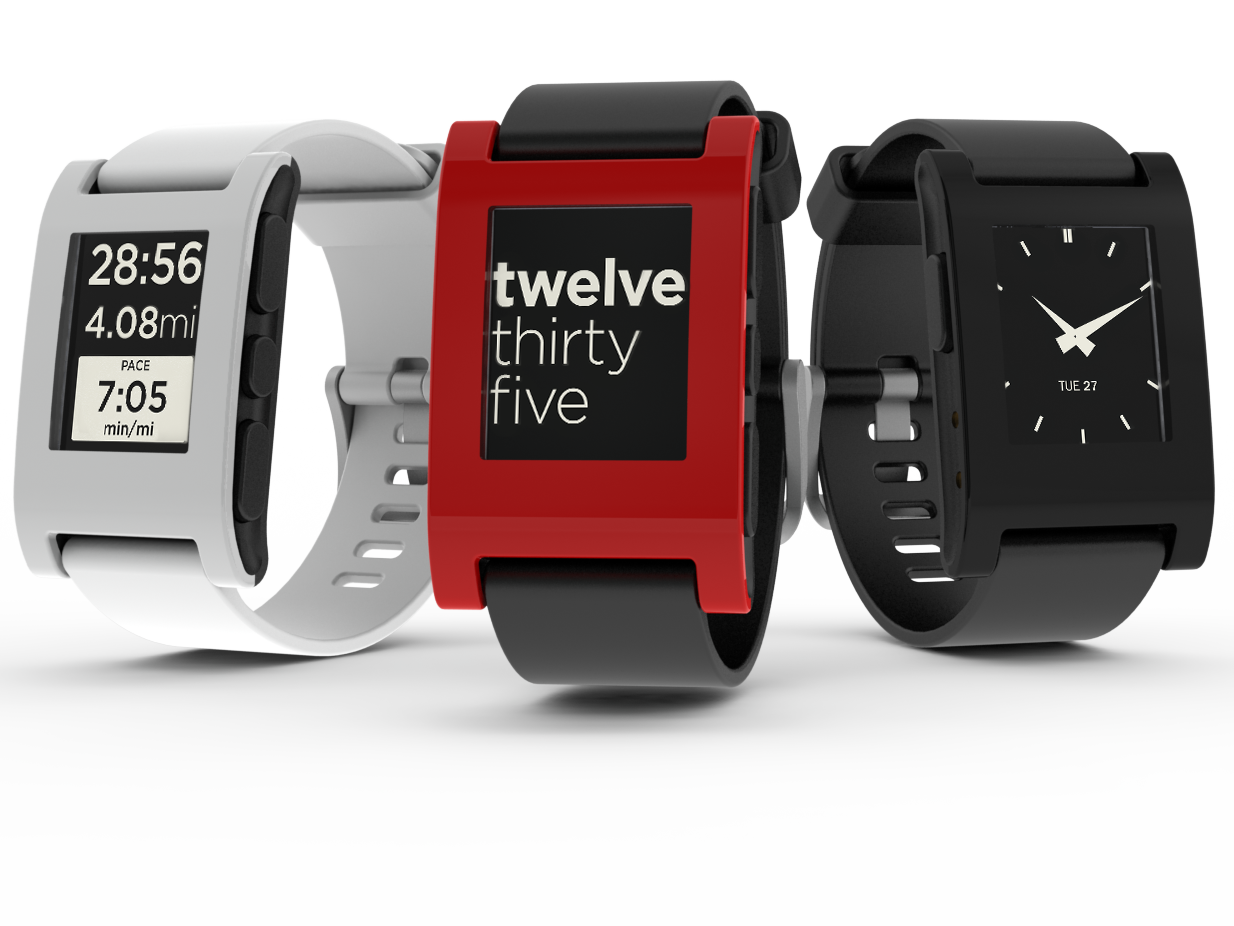
  • Pebble, like Kreyos, works with a smartphone and costs $150.

File:Pebble watch trio group 04.png
Pebble
Kreyos


  • Fashion and watch designer. It's likely that some traditional watch builder will sooner or later try to enter this market. But centuries of experience building high precision watches with mechanics is different from building electronics into a tiny piece of hardware. Martian product is trying to combine the elegance of classical watch with a connected device, price is around $250. Some days, we might see TagHeuer or Rolex developing such a device
Martian Victory Watches
Martian watches as seen on website


If you want to know more, go to http://www.smartwatchfor.com/, it's a great review of all available devices on the market, it's very up to date and there's a breakout by operating system.

Kreyos has done some comparisons with their competition that you can found here and below (it looks quite accurate though).


Sunday, June 23, 2013

The "Quantified self" movement.

One of my favorites authors, Jacques Attali wrote a book ten years ago ("L'homme nomade" aka the Nomad) in which he predicted that people, in a near future, would try to monitor their body and their health, using wearable devices to track their heart rate, sleep etc.

This is no longer science fiction but reality.
This week, the famous New York investor Fred Wilson draw a lot of attention by explaining how happy he was about his new scale because he can measure his body mass fat on top of his weight(http://www.avc.com/a_vc/2013/06/withings-scale.html) and track all this on his smartphone!

Personally, I'm a big fan of these new gadgets.
Today you can track how much you sleep, walk, run thanks to numerous watches, wristbands and balances!
It's interesting to see how devices are converging from GPS watches/wristbands tracking your numbers of paces to balances synchronizing your latest data.
This is the concept behind this quantified self movement: having people aware of their numbers make them more careful about their diet, health and so on.

There are a couple of hardware suppliers that I know of and which I have personally tried.

Nike has done a great job with their Nike+Fuel Band and the Nike/TomTom watch but the interface can be sometimes confusing or too simple!
I had the TomTom Nike watch but it broke after 2 runs...(Amazon re-credited the money on my account very easily!).
I have tried the Nike+ Pod in the shoe, but it's obsolete now compared the Nike  Fuel Band, which is very expensive by the way.

Garmin is a well known player in the Handheld GPS space, and they have successfully made a breakthrough in the GPS watches space. I have used several Garmin watches and handheld GPS, they are reliable, solid and not too expensive. On the minus side, the Garmin Connect site (to upload data and see results) has improved but remains quite austere.
I hope Garmin will soon make a wristband.

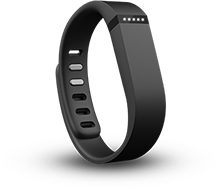
My favorite these days is Fitbit. They started with pedometers, but they broadened their product's portfolio with the famous Flex wristband, which is out of stock for another 4 weeks!
The price ($99) and the Bluetooth synchronization with smartphone give them a huge competitive edge (Nike and Jawbone do synchronization via USB). Fitbit is one a the few players in this industry (if not the only one) who can propose a wristband, a very cool app on the smartphone and a scale!

Fitbit Flex


One could expect a proliferation of such devices in the near future, encouraged by mobile operators, always eager to promote data usage (Jawbone has a distribution exclusivity with ATT retail stores) and consumers from the Y Generation eager to live a more healthy life.


http://quantifiedself.com/

Thursday, June 20, 2013

Android fragmentation

I have been hearing from months if not years now about Android being a fragmented ecosystem and issues that might represent for carriers, enterprise and eventually the 900 millions of end users
(there's even a website talking just about that topic: http://androidfragmentation.com/news#).
 
On my side, I've decided to do a little bit of investigation on that topic, below are a few elements.
 
First, anyone can easily find information about Android breakout of versions on...Google website. Google seems very open about this and share a lot of information (http://developer.android.com/about/dashboards/index.html)
 
There are 7 different versions of Android, none of these versions has more than 40% distribution, the three largest being:
  • Ginger Bread 2.3 with 36%
  • Ice Cream Sandwich 4.0 with 26%
  • Jelly Bean 4.1 and .2 with 33%
Until recently, you could see the release date of these different versions, but Google removed these dates, probably to avoid any questions related to the obsolescence of the software.
Indeed, Ginger Bread the oldest version has been released in 2010 and Jelly Bean, the latest arrived at Google IO 2012.


Android distribution versions as seen on their website

Now, anyone could say "OK, so Android is having the biggest market share but the versions are different, and so what?"
The problem is the application development and the hardware support.
As a end user, who am I calling if I have issues with my Samsung Galaxy software? Google? Samsung? ATT?
Even worse is when carriers are adding their apps to the device, this can lead to slowdown of the device or battery drains in some situations.
On the other hand, a Motorola Droid at Verizon for example is all but an open source product. Its software has been validated by the carrier and the ability to customize is very limited. Strangely enough, this kind of device is closer in its philosophy to Microsoft Windows Phone than to the original Android devices.

This Is What Android Fragmentation Looks Like
Tim Cook explaining how bad is Android fragmentation for developers!

To address some of the apps developer's concerns, Android seems to be working on a version 5 (Key Lime Pie) that would require less memory and system resources to run.
As a result an "old" user of an Android device could be eligible for a version upgrade...then comes the problem of who will make this upgrade available.
Because, instead of upgrading over the air millions of old devices, mobile operators, device makers and even Google would prefer to sell new ones!
 
Let's wait and see if Key Lime Pie will bring more value to Android, as all metrics point to the fact that economics for Android are less interesting than on iOS.

Some interesting to go further on that topic:
http://www.androidcentral.com/
http://www.androidcentral.com/android-versions
http://en.wikipedia.org/wiki/Android_(operating_system)

Tuesday, March 19, 2013

T-Mobile=Netflix?

Is T-Mobile the Netflix of the mobile operators world?

We know the current situation of Netflix trying to re-invent the relationship between TV viewers and broadcasters, by ultimately dis-intermediating the classical TV channels (NBC, CBS, ABC, Fox)
The recent release of the TV Series "House of Cards" is a perfect example of this change of business model, this (fun) TV show is only for Netflix subscribers, and the full season is available at once!
It was so successful that they are filming the second season!


Although the business models are different, is T-Mobile going to reinvent the relationship between cellphone subscribers and carriers?

It seems like it's the case by listening to their charismatic new CEO, John Legere.
They called in the press for an event on March 26th in New York where they will expose their new business model.
Judging by the tone of the invite "We're still a wireless company. We're just not going to act like one anymore", everyone expect them to announce the end of all subsidies for 2 years contract, in exchange of a lower monthly rate for their subscription.

T-Mobile has always been an "agitator" of the US cellphone market, let's see if this goes beyond a marketing and communication promise!


Monday, March 18, 2013

iPhone, iPod, iThermostat?

It is very interesting to note that since Steve Jobs passed away, many Apple execs have left the company to do something different.
I noticed two of these startup, Leapmotion and Nest.

Nest is all about bringing the cool design of an Iphone to your home thermostat! And you pay the price for all that coolness: $249 at BestBuy or Amazon.
http://nest.com/

Leapmotion's promise is related to the control of PC, sorry Macs! It will be available in May, but it sounds like a very exciting device that will turn your mouse and keyboard into dust collectors!
https://www.leapmotion.com/

In both cases, the leadership teams of these companies are composed  with former Apple executives with innovative ideas and design.
I wish them the same success as their previous company!

Friday, March 15, 2013

Mobile World Congress 2013 Debrief

There was a time, when Mobile World Congress used to be called 3GSM (and happened in Cannes, France) when the biggest booths were the ones from Motorola, Nokia or even Sagem.
Sierra Wireless was shipping ruggedized Windows Mobile phones, and 3G was a distant dream, hence the naming "3GSM"...all this was less than 10 years ago!

This year, even the logistics have changed dramatically.
The show doesn't take place anymore in the Gran Fira, next to an authentic historic Arena (finally renovated) but in the very convenient Fira Via, fully equipped to accommodate 70,000 persons. Of course, it less glamorous than the previous places, you are no longer surrounded by Spanish architecture, but the set up is very convenient.
The first halls were fully dedicated to meeting spaces, hence you find yourself in front of huge booth closed to the public and under strict security (LG, Samsung, etc), so it was very easy to navigate between booth and meeting spaces without leaving the show. Gone is the time when each major player had to privatize entire hotel to manage their side meetings!

For me, the key learning's from last week were around the mobile OS and the Chinese handset manufacturers:

Mobile OS-Android fragmentation and the fight for the third place.

While RIM still struggles for its life, Mozilla made a lot of noise by announcing their FirefoxOS with the support of 18 major carriers (they announced launches with Telefonica and America Movil in Latam). Alcatel One Touch, ZTE and LG are among the device makers behind that initiative, targeting a $100 transfer price with a...Qualcomm chipset!

On the other side of the spectrum, Windows Phone is in a great position to capture that market share, but despite their recent progress, the carriers still have to push MSFT to fill that place.

Then, it's interesting to note that Samsung isn't at all in Mozilla, and they are replacing Bada (their last mobile OS initiative) with Tizen in some of their phones. Does that mean that Samsung wants to take distance with Google? It is very likely and the Galaxy S4 launch goes into that direction.
Samsung isn't the only one who customize Android. For its P2 Ascend Smartphone, Huawei has customized the Android 4.1 interface with its own layer called "Emotion", what a program!

The conclusion of all these initiatives make me think that the fight for Mobile OS domination is just starting actually. The pure Android OS is not "enterprise ready" and massive deployments in large corporations still remain to be seen. On the other hand, all device makers are customizing their Android OS, which will lead to worse fragmentation and complex interoperability for carriers.

All the discussions in Barcelona led to the conclusion that "pure" Android market share has reached its ceiling, now the question is who will win the third place: Windows Phone? RIM? Mozilla? Tizen? Or someone else?

Beyond the mobile OS war, it was very surprising to witness the massive wave of Chinese device makers on the show floor: Huawei, Lenovo etc were having huge booth where they displayed cheap hardware.

More to comment soon with the Galaxy S4 launch in New York and the reactions it will trigger.


Wednesday, February 20, 2013

Veillee d'armes avant Mobile World Congress.

Que de temps s'est ecoule depuis ces postes il y a bientot 7 ans!
Entretemps, Motorola a disparu (absorbe par Google), Nokia n'est plus le fringant OEM que l'on connaissait, RIM va peut etre disparaitre tandis que le marche est monopolise par 2 acteurs qui n'existaient pas (sur ce marche) en 2006: Apple et Android!

Quoiqu'il arrive, tout ce petit monde de la mobilite (60000 participants attendus en Espagne) se prepare pour sa grande fete annuelle a Barcelone!
Dans tous les HQ du monde, les "staffers" preparent les "briefings documents" pour les "executives". Les commerciaux affinent leurs presentations en incorporant les derniers elements techniques (features), le marketing met la derniere touche a ses lancements prevues pour lundi (toute entreprise digne de ce nom se doit de lancer ou d'annoncer quelque chose lundi a Barcelone) et les PR s'appretent a ne pas dormir!

C'est pour tout cet ecosysteme un evenement incontournable que l'on ne manquera pas d'observer!
A suivre donc!